As a beginner to search engine optimization (SEO) you need to understand that there is no magic way to rank your website in the first page of Google, Bing or Yahoo. Search engines are governed by complex algorithms and it takes a lot of time and effort to ‘convince’ them that your website or web page deserves one of the top spots.
Nevertheless, there are certain rules you can follow to optimize your website and provide the search engine bots with the necessary signals.
While the web is floated with SEO tips and advice, most of the articles talk about SEO in a theoretical level and not how SEO can be applied in practice.
In my opinion, this is why most website owners are confused and they either give up with SEO or simply do not get the expected results.
What you will read in this post is SEO advice that works. I have tested this strategy over the years on a number of websites with remarkable results.
Of course there are many other things you can do to help your website achieve better rankings, but the SEO tips presented below will give you a solid and reliable framework that is 100% safe (i.e. without taking any risks of getting a Google Penalty) and above all, it works.
In addition to the tips, I have added real examples from two web sites that I’ve been doing SEO work, to help you understand how to apply the guidelines on your own website or blog.
1. Page Titles and description
Page titles
Page titles are a very important aspect of SEO and this is why it is the first item on my list.
My findings the last couple of months showed that page titles are more important than ever especially for Google SEO.
The most important characteristics of an optimised page title are:
- Each page needs to have a unique page title that accurately describes the page’s content.
- Be brief and descriptive.
- Help the user understand what the page is about
Home page title: The title for your homepage can include the name of your website/business and other bits of important information like the physical location of your business or maybe a few of its main focuses or offerings. For example:
Post/other pages title:
The titles of other posts/pages of your website should accurately describe what the page is about and be attractive to the searcher.

Description
The page description meta tag is also very important. It gives users, Google and other search engines a summary of what the page is about.
Google may choose to show what you type in the description as a snippet for your page or may decide to use a part of your page’s content.
In other words, it does not mean that what you write in the description will show in the snippet. The guidelines for writing a good description are:
- Always provide a unique description for all pages, post, products of your website.
- Keep the size between 140-150 characters.
- Avoid repeating the title in the description
- Don’t add too many keywords
- Try to use the description as a way to ‘advertise’ your page to the reader so that they click on your title and visit the page.
You can see the example below on how I use the description tag on my seo guidepage.

2. Permanent link structure
The permanent link structure is a term used to describe the format of URLS for pages (categories/tags) or individual posts of a web site.
It is shown in the browser address bar and in the search results (below the page title).
SEO Guidelines for URLS
- Make Urls simple and easy to understand for search engines and users
- Use hyphens ‘ – ‘ to separate the words that make up a url
- Avoid lengthy Urls with unnecessary information
- Use words that describe what the page is about but avoid keyword stuffing
Examples of BAD url structures
- http://www.example.com/UK/123213/5005.html
- http://www.example.com/socialmedianews
- http://www.example.com/id=7&sort=A&action=70
Examples of GOOD url structures
- http://www.example.com/social-media-news
- http://www.example.com/2002/12/social-media-news
3. Breadcrumb
Make sure that you have a breadcrumb on all your internal pages. A breadcrumb is a set of links at the top of the page that aid navigation. If you are using WordPress there are many free plugins to create a breadcrumb.

4. Internal links
When we talk about internal links we mean links in a page that point to other pages within the website i.e. not external links.
In the example below, when you click on the link with anchor “increase the intensity” you will be redirected to a page with-in the website to find out more information on how to increase the intensity of an exercise.

Internal linking is a very important factor for website SEO but still many web site owners are not using it correctly. The rules to follow for internal links are simple:
- Link related articles together either by using keyword anchor text or by using the full article title.
- Make sure that the links are useful both for the user and easy to understand by search engines.
- Don’t make links for search engines only. An internal link should help the user navigate the site better.
- Do not use terms like ‘click here’ or ‘[..]’ for internal linking.
- Don’t overdo it. A few internal links per page are enough (create more if really necessary)
Pro Hint: Don’t always link old posts from new posts but every couple of weeks go back and link newer posts from older posts.
It’s not an easy task to do especially if you have a lot of posts but it’s a very valuable tool for on-site SEO.
5. Text formatting and the use of H1, H2 and H3
Don’t just publish text on your website without first doing some basic formatting. This is not good for the user experience and works against your SEO efforts.
General guidelines for formatting a post or page on your website:
- Use H1 tags for the title of your post
- Use H2 tags for the main headings of your post.
- Use BOLD and Italics to draw users attention
- Don’t use H2 tags for all your headings
- Write small paragraphs
- Use a font size that is easy to read
When formatting your posts always have in mind the user experience. Can the user identify the main sections of your post (H2 tags) just by looking at the page? Is the text easy to read on all devices (smartphones, Apple Ipads, Android tablets etc)?
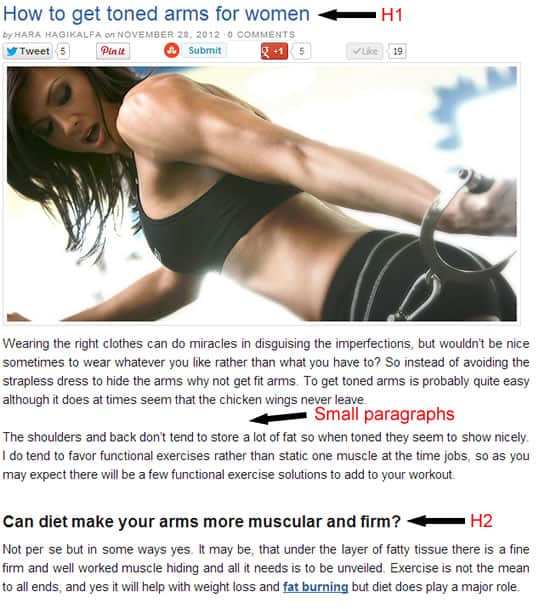
Click on the image for a larger view (and to see H2)
6. The 404 Page
SEO is about improving the user experience and a proper 404 page contributes to that goal.
The 404 page is the page shown when a user is looking for a page on your site that doesn’t exist or mistypes a URL or follows a broken link. When the 404 page is not configured looks like this:
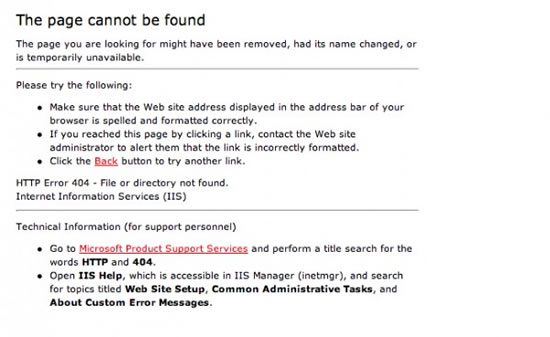
This is not useful for the user and negatively impacts the user experience.
A properly configured 404 page should:
- Give some info to the user of what happened rather than displaying “Not found”
- Have a design consistent with the rest of the website
- Give options to the user to navigate to other pages of the site.
If you are using a professional theme (like Thesis), it takes care of the 404 page. This is how my 404 page looks like:


No comments:
Post a Comment